Every Browser Has Become an Endpoint
Modern businesses depend on web browsers more than ever before.
Employees access:
- Microsoft 365
- Google Workspace
- Salesforce
- AWS
- Banking portals
- HR systems
- Payment applications
- Internal dashboards
While organizations invest heavily in endpoint protection, firewalls, identity management, and cloud security, one attack surface often receives little attention:
Browser extensions.
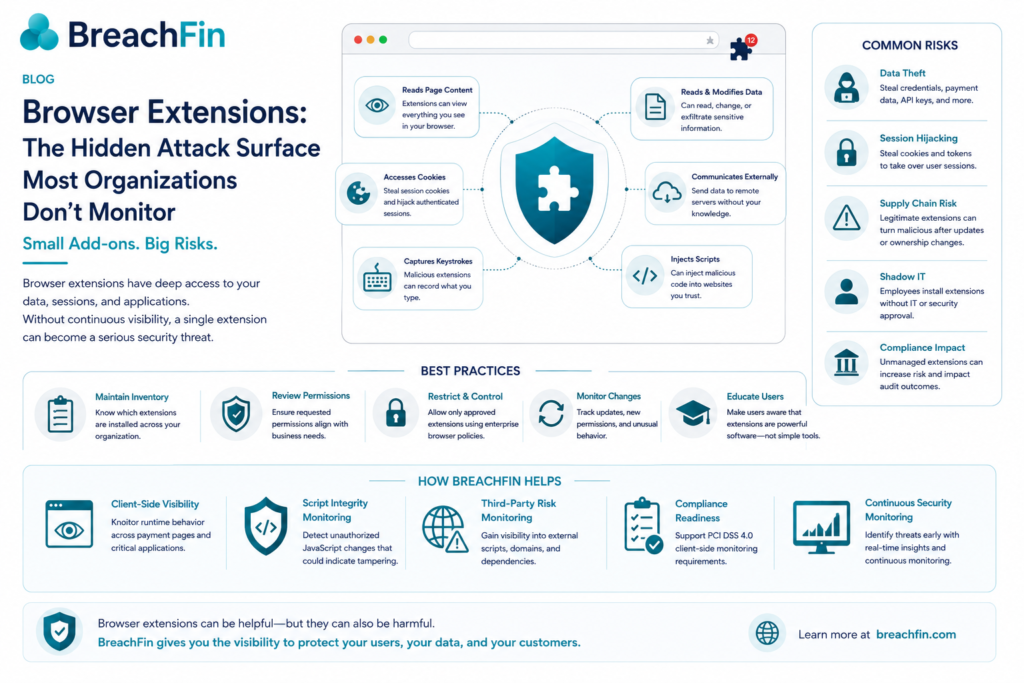
A single malicious or compromised browser extension can read sensitive data, intercept authentication tokens, inject JavaScript into web pages, capture keystrokes, and communicate with external servers—all without exploiting a traditional software vulnerability.
As organizations continue to adopt SaaS applications and browser-based workflows, browser extensions have become an increasingly attractive target for attackers.
What Are Browser Extensions?
Browser extensions are small software components that add functionality to web browsers.
Common examples include:
- Password managers
- Grammar assistants
- Screenshot tools
- AI assistants
- PDF editors
- Ad blockers
- Shopping plugins
- Developer tools
Many employees install dozens of extensions without realizing the level of access they request.
Why Browser Extensions Are Risky
Extensions often request permissions such as:
- Read browsing history
- Access cookies
- Read page content
- Modify web pages
- Inject scripts
- Download files
- Read clipboard data
- Access authentication tokens
Once granted, these permissions can provide attackers with access to valuable information.
Common Security Risks
Data Theft
Malicious extensions can collect:
- Login credentials
- Payment information
- Customer data
- Session cookies
- API keys
- Sensitive business documents
Because they operate inside the browser, traditional network controls may never detect the activity.
Session Hijacking
Many modern applications rely on session cookies rather than passwords after login.
If an extension steals these cookies, attackers may be able to impersonate users without needing their credentials or bypassing MFA.
Supply Chain Compromise
An extension may be trustworthy when installed but later become malicious after an update or a change in ownership.
This creates a software supply chain risk where users unknowingly receive harmful code through routine updates.
Shadow IT
Employees frequently install extensions without approval from IT or security teams.
This creates an unmanaged inventory of browser software that can expand the organization’s attack surface.
Browser Extensions and Compliance
For organizations subject to PCI DSS, SOC 2, ISO/IEC 27001, or NIST frameworks, unmanaged browser extensions can increase operational risk.
Extensions that interact with payment pages or sensitive customer information should be evaluated as part of a broader security governance program.
Continuous visibility into browser activity supports stronger control over client-side risks and helps security teams identify unauthorized behavior.
Best Practices for Managing Browser Extension Risk
Organizations should consider:
Maintain an Extension Inventory
Know which extensions are installed across managed devices.
Review Permissions
Evaluate whether requested permissions are appropriate for the extension’s purpose.
Restrict High-Risk Extensions
Limit installations to approved or business-necessary extensions through enterprise browser policies.
Monitor for Changes
Track extension updates, new permissions, and unexpected behavior over time.
Educate Users
Employees should understand that browser extensions are software applications with privileged access—not simple browser customizations.
How BreachFin Helps
Browser security extends beyond monitoring JavaScript loaded by websites.
Organizations also need visibility into what executes inside the browser environment.
BreachFin helps security teams strengthen client-side security through continuous monitoring of browser-based risks.
Client-Side Visibility
Monitor runtime behavior across payment pages and critical applications.
Script Integrity Monitoring
Identify unauthorized JavaScript changes that could indicate tampering or digital skimming.
Third-Party Risk Monitoring
Gain visibility into external scripts, domains, and dependencies interacting with customer-facing applications.
Compliance Readiness
Support PCI DSS 4.0 client-side monitoring requirements with continuous evidence collection and runtime visibility.
Continuous Security Monitoring
Track changes in browser execution, application behavior, and third-party interactions to identify emerging risks before they affect customers.
Final Thoughts
As organizations continue to move critical business processes into the browser, attackers are following the same path. Browser extensions represent a frequently overlooked attack surface capable of exposing sensitive data, authentication tokens, and customer information.
A modern cybersecurity strategy should include visibility into what executes inside the browser—not just what reaches the network or cloud infrastructure. By understanding extension risk and continuously monitoring client-side activity, organizations can reduce exposure, strengthen compliance efforts, and improve resilience against emerging browser-based threats.
At BreachFin, we believe browser security is a critical component of modern cyber defense. Continuous monitoring of client-side activity, third-party scripts, and browser interactions helps organizations detect threats earlier and maintain confidence in the applications their users rely on every day.