
JSON Web Tokens (JWT) are a foundational building block of modern authentication. They power APIs, SaaS platforms, mobile apps, and distributed systems — yet many teams use them without fully understanding how they actually work.
This blog explains how JWT works end-to-end, from login to request validation, in clear and practical terms.
What Is a JWT?
A JWT (JSON Web Token) is a self-contained, cryptographically signed token used to prove identity and authorization between systems.
At a high level:
- The server issues a token after authentication
- The client stores the token
- The client presents the token on each request
- The server verifies the token without needing a database lookup
This is what makes JWT stateless.
The Structure of a JWT
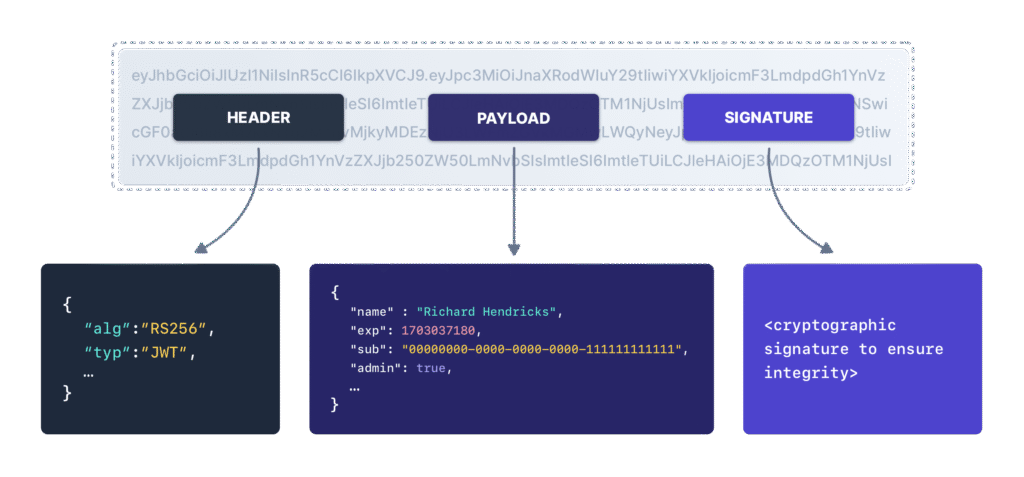
A JWT is made of three Base64-encoded parts, separated by dots:
header.payload.signature
1. Header
Defines metadata about the token:
- Signing algorithm (e.g., RS256)
- Token type (JWT)
Example:
{
  "alg": "RS256",
  "typ": "JWT"
}
2. Payload (Claims)
Contains statements about the user or system.
Common claims:
sub– subject (user ID)iss– issueraud– audienceexp– expiration timeiat– issued atscopeorroles
Important:
The payload is not encrypted — anyone can decode it.
3. Signature
The signature ensures:
- The token was issued by a trusted authority
- The payload has not been modified
It is created using:
base64(header) + "." + base64(payload) + private key
If anything changes, signature verification fails.
How JWT Works: Step-by-Step Flow
Step 1: User Authenticates
The user logs in using:
- Username/password
- SSO
- OAuth
- MFA
Credentials are validated once.
Step 2: Server Issues a JWT
After successful authentication:
- The server creates a JWT
- Adds identity and authorization claims
- Signs the token with a private key
- Sends it back to the client
No session is stored on the server.
Step 3: Client Stores the Token
Depending on the platform:
- Browser: memory or HttpOnly cookie
- Mobile app: secure storage
- API client: in-memory variable
The token now represents the authenticated identity.
Step 4: Client Sends JWT with Each Request
The JWT is sent on every request, usually in the header:
Authorization: Bearer <JWT>
No cookies or server sessions are required.
Step 5: Server Verifies the JWT
For every request, the server:
- Verifies the signature
- Checks expiration (
exp) - Confirms issuer (
iss) - Confirms audience (
aud) - Enforces scopes or roles
If validation passes, access is granted.
If validation fails, the request is rejected.
Why JWT Is Stateless (and Why That Matters)
Traditional session systems:
- Store session data server-side
- Require database or cache lookups
- Are harder to scale across services
JWT systems:
- Require no server-side session storage
- Scale easily across microservices
- Allow independent services to verify tokens
This is why JWT is popular in:
- APIs
- Microservices
- Cloud-native architectures
Access Tokens vs Refresh Tokens
JWT systems usually use two token types:
Access Token
- Short-lived (minutes)
- Used for API calls
- Frequently rotated
Refresh Token
- Long-lived
- Used only to request new access tokens
- Stored more securely
This design limits damage if an access token is stolen.
What JWT Does Not Do
JWT does not:
- Encrypt data
- Protect against XSS by itself
- Replace authorization logic
- Prevent token theft
JWT only proves:
“This token was issued by us and has not been altered.”
Everything else is your responsibility.
Where JWT Fails in the Real World
Most JWT compromises happen outside the backend:
- Tokens exposed to JavaScript
- Third-party scripts accessing storage
- Browser-side injections
- Shadow integrations and extensions
Once a token is stolen, attackers don’t need passwords.
How BreachFin Fits In
JWT security breaks down most often in the browser, not the API.
BreachFin provides:
- Visibility into browser-executed scripts
- Detection of unauthorized client-side access
- Monitoring for risky integrations and injected code
This helps organizations protect JWTs where modern attacks actually occur.
Final Takeaway
JWT works by:
- Issuing a signed, self-contained token
- Sending it with every request
- Verifying it cryptographically
- Avoiding server-side sessions
JWT is fast, scalable, and powerful — when you understand how it works and secure the environments where tokens live.
Authentication doesn’t stop at token issuance.
It ends where the token can be stolen.