Not Every User Needs Administrator Access
Identity and Access Management (IAM) is the foundation of cloud security. It determines who can access your cloud resources, what actions they can perform, and which services they are authorized to use.
Unfortunately, many organizations prioritize convenience over security by granting users broad administrative permissions. While this may simplify day-to-day operations, it also creates one of the most common and dangerous cloud security risks.
When a compromised account has excessive permissions, attackers gain access far beyond what they actually need.
The principle is simple:
The fewer permissions an identity has, the smaller the attack surface becomes.
What Are Over-Permissive IAM Policies?
IAM policies define the actions users, applications, and services can perform within cloud environments.
An over-permissive policy grants access beyond what is required for a specific role or responsibility.
Examples include:
- Granting AdministratorAccess to all developers
- Using wildcard (
*) permissions - Allowing unrestricted access to all S3 buckets
- Giving every engineer full access to production resources
- Sharing administrator accounts among multiple users
These permissions significantly increase organizational risk.
Why Attackers Love Over-Permissive Accounts
Cybercriminals rarely attack cloud infrastructure directly.
Instead, they steal legitimate credentials through:
- Phishing emails
- Malware
- Credential leaks
- Weak passwords
- Exposed API keys
- Social engineering
If the compromised account has administrator privileges, attackers can immediately begin exploring the environment.
They may:
- Create new administrator accounts
- Disable security logging
- Access sensitive databases
- Deploy ransomware
- Delete backups
- Exfiltrate confidential data
- Create persistent access mechanisms
The attack becomes much more damaging simply because excessive permissions already exist.
Common IAM Mistakes
Using Administrator Access for Daily Work
Administrative privileges should only be used when absolutely necessary.
Everyday activities such as reading logs, deploying applications, or reviewing reports rarely require full administrator access.
Dedicated administrative accounts reduce unnecessary exposure.
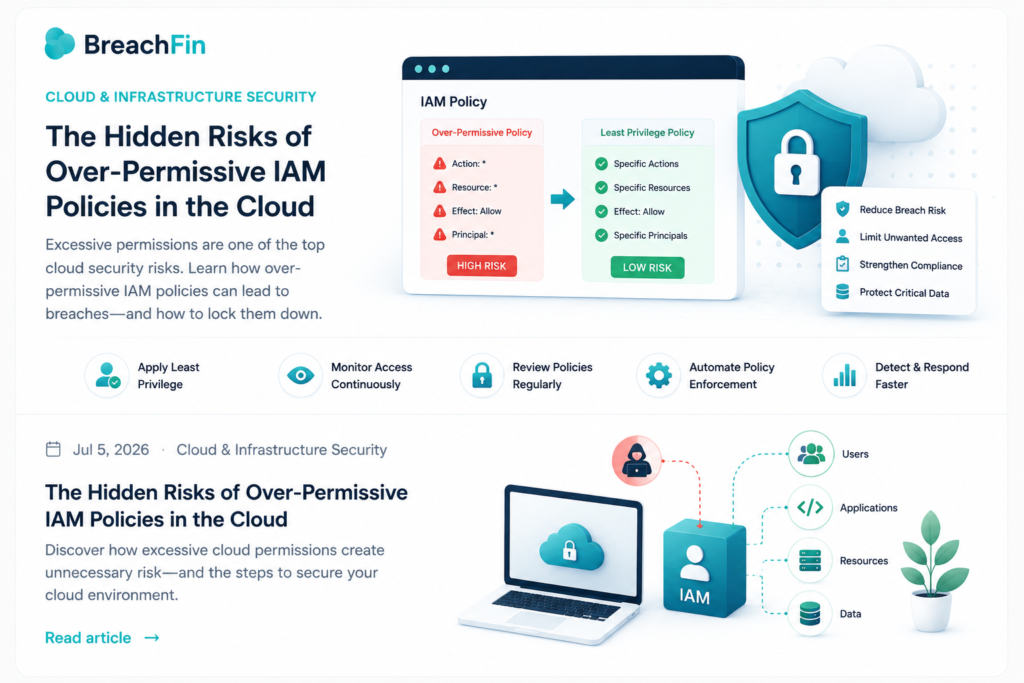
Wildcard Permissions
Policies such as:
Action: *
Resource: *
Effect: Allow
provide unrestricted access across the cloud environment.
While convenient during testing, they should never remain in production.
Forgotten Users and Service Accounts
Old employees, contractors, and legacy applications often retain access long after it is needed.
Inactive accounts become attractive targets because they are rarely monitored.
Organizations should review identities regularly and remove unused accounts promptly.
Excessive Service Permissions
Applications frequently receive permissions far beyond their operational requirements.
For example, an application that only needs to read storage objects should never have permission to delete or modify every resource in the environment.
Least-privilege access limits the impact of compromised workloads.
The Principle of Least Privilege
Least privilege means granting only the permissions required to perform a specific task—nothing more.
Examples include:
- Developers access development resources only.
- Finance teams access billing systems only.
- Security teams manage security services only.
- Applications receive only the API permissions they require.
By limiting unnecessary access, organizations significantly reduce the potential impact of compromised credentials.
Best Practices for Secure IAM
Grant Role-Based Access
Assign permissions based on job responsibilities instead of individual users.
Role-Based Access Control (RBAC) simplifies management while maintaining consistent security.
Continuously Review Permissions
Cloud environments change rapidly.
Regular access reviews help identify:
- Unused permissions
- Dormant accounts
- Privilege escalation
- Policy drift
- Unauthorized access
Continuous reviews reduce long-term risk.
Enable Multi-Factor Authentication
MFA adds another layer of protection for privileged accounts.
Even if passwords are compromised, attackers must still pass an additional authentication factor.
Monitor IAM Activity
Security teams should monitor:
- Failed login attempts
- Privileged account usage
- New user creation
- Policy modifications
- Access key creation
- Geographic login anomalies
Continuous monitoring enables rapid detection of suspicious behavior.
Rotate Credentials
Long-lived access keys increase exposure.
Regularly rotate:
- Access keys
- API tokens
- Service account credentials
- Administrative passwords
Credential rotation limits the usefulness of stolen identities.
IAM and Compliance
Strong identity management supports many security frameworks, including:
- PCI DSS
- ISO 27001
- SOC 2
- NIST Cybersecurity Framework
- CIS Controls
Auditors increasingly focus on user permissions, privileged access, and access review processes as part of modern compliance assessments.
Building a Secure IAM Strategy
Organizations should establish an IAM program that includes:
- Role-Based Access Control (RBAC)
- Least-privilege policies
- Multi-Factor Authentication
- Regular permission reviews
- Privileged Access Management (PAM)
- Continuous monitoring
- Automated policy enforcement
- Identity lifecycle management
Identity is the new security perimeter, making IAM one of the most important investments an organization can make.
Final Thoughts
Cloud security begins with controlling who has access to your environment. While granting broad permissions may seem convenient, it dramatically increases the impact of compromised accounts and insider threats.
By enforcing least privilege, implementing role-based access, monitoring privileged activity, and reviewing permissions regularly, organizations can significantly reduce cloud security risks while strengthening compliance and operational resilience.
Good cloud security is not about giving everyone access—it is about giving the right people the right access at the right time.