The End of Implicit Trust
For decades, organizations built cybersecurity around a simple idea: once a user or device was inside the corporate network, it could generally be trusted. Firewalls protected the perimeter, VPNs granted remote access, and internal systems communicated with minimal restrictions.
That model no longer works.
Today’s workforce is distributed across homes, offices, cloud platforms, and mobile devices. Applications run across multiple cloud providers, third-party SaaS platforms, and hybrid environments. Attackers know that once they gain access to a network, moving laterally is often easier than breaching the perimeter.
Zero Trust was developed to address this challenge.
Its core principle is simple:
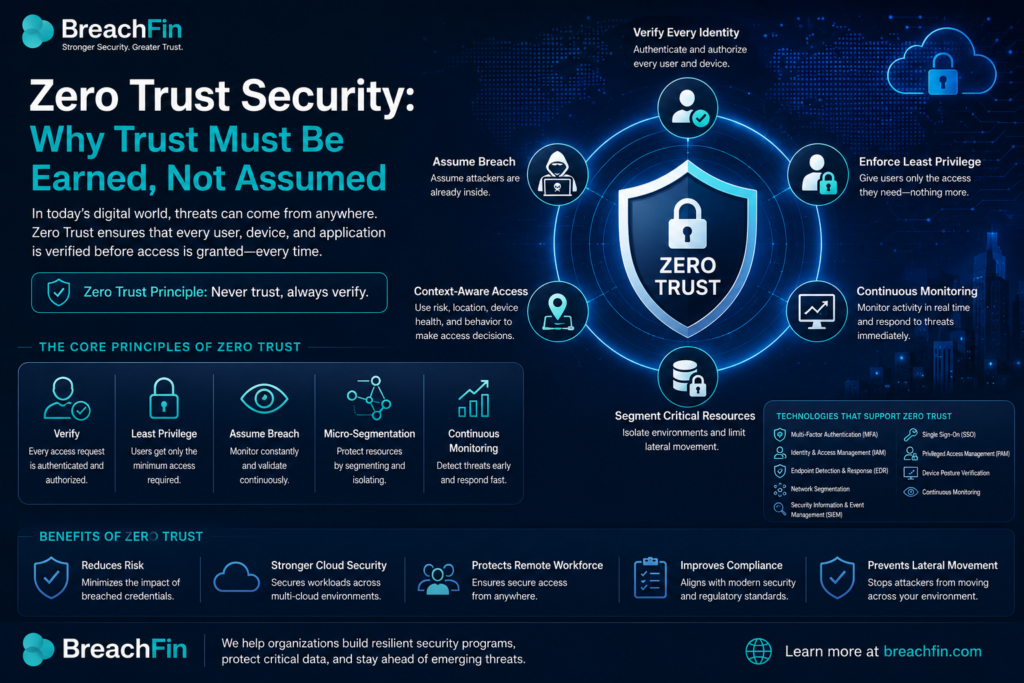
Never trust. Always verify.
Every user, device, application, and connection must continuously prove its identity and authorization before gaining access.
What Is Zero Trust?
Zero Trust is a cybersecurity strategy that assumes no user or device should be automatically trusted—even if it is already inside the corporate network.
Instead of relying on network location, Zero Trust verifies:
- User identity
- Device health
- Application access
- Network context
- Risk level
- Continuous authentication
Access is granted based on multiple security signals rather than trust alone.
Why Traditional Security Falls Short
Traditional security models assume that once users successfully authenticate, they can freely move across internal resources.
This creates opportunities for attackers.
If a compromised account gains VPN access, an attacker may attempt to:
- Discover internal systems
- Access sensitive databases
- Escalate privileges
- Deploy ransomware
- Steal confidential information
Zero Trust limits this movement by verifying every request and restricting unnecessary access.
The Core Principles of Zero Trust
Verify Every Identity
Every access request should validate:
- User identity
- Multi-factor authentication
- Device compliance
- User location
- Risk score
Authentication should not happen only once at login—it should continue throughout the session.
Enforce Least Privilege
Users should only receive the permissions necessary to perform their jobs.
Examples include:
- Developers accessing development environments only
- Finance employees accessing accounting systems
- Contractors receiving temporary permissions
- Administrators using privileged accounts only when required
Reducing unnecessary permissions limits the potential impact of compromised accounts.
Assume Breach
Zero Trust assumes attackers may already be inside the environment.
Organizations should continuously monitor for:
- Unusual login activity
- Impossible travel
- Privilege escalation
- Data exfiltration
- Suspicious API calls
- Unauthorized configuration changes
Rapid detection minimizes damage.
Segment Critical Resources
Instead of placing everything on one trusted network, organizations divide systems into smaller security zones.
For example:
- Payment systems
- Customer databases
- HR applications
- Development environments
- Administrative systems
If one environment is compromised, segmentation helps contain the attack.
Zero Trust in Cloud Environments
Cloud computing has accelerated Zero Trust adoption.
Modern organizations commonly use:
- AWS
- Microsoft Azure
- Google Cloud
- Microsoft 365
- Salesforce
- GitHub
- Slack
Because these services are accessed from anywhere, security must focus on identity rather than network location.
Strong identity management, conditional access policies, and continuous monitoring become essential.
Technologies That Support Zero Trust
A successful Zero Trust strategy often includes:
- Multi-Factor Authentication (MFA)
- Single Sign-On (SSO)
- Identity and Access Management (IAM)
- Endpoint Detection and Response (EDR)
- Privileged Access Management (PAM)
- Device posture verification
- Network segmentation
- Security Information and Event Management (SIEM)
- Continuous monitoring
No single product provides Zero Trust. It is a comprehensive security approach built from multiple technologies working together.
Benefits of Zero Trust
Organizations adopting Zero Trust can:
- Reduce the risk of credential theft
- Limit ransomware spread
- Strengthen cloud security
- Improve regulatory compliance
- Protect remote workers
- Increase visibility into user activity
- Minimize insider threats
As cyber threats evolve, continuous verification provides stronger protection than perimeter-based security alone.
Building a Zero Trust Roadmap
Implementing Zero Trust does not happen overnight.
A practical roadmap includes:
- Inventory users, devices, applications, and data.
- Enable Multi-Factor Authentication across all critical systems.
- Review and reduce excessive user privileges.
- Implement conditional access policies based on risk.
- Segment sensitive environments and workloads.
- Continuously monitor authentication events, device health, and network activity.
- Regularly review access permissions and security policies.
Organizations that take an incremental approach often achieve better long-term security outcomes.
Final Thoughts
As businesses continue adopting cloud services, remote work, and interconnected applications, relying on implicit trust is no longer sufficient. Zero Trust shifts the focus from network boundaries to continuous verification, ensuring that every access request is evaluated based on identity, context, and risk.
By enforcing least-privilege access, validating every connection, segmenting critical resources, and continuously monitoring user activity, organizations can significantly reduce the likelihood and impact of cyberattacks. Zero Trust is not a single technology—it is a modern security strategy that helps build resilient, secure, and compliant digital environments.